
A buyer worksheet for 3D Printer Slicer: questions raised by evidence mapping for early research
When maintenance planners assess a 3d printer slicer, the first task is not to rank features. It is to define the work that the software must support, identify the printer and material context, and record which statements come from the source page. This approach keeps early research useful without turning a product description into a broader suitability claim.

Separate category, application, and model scope
Start the worksheet with three separate fields: software category, intended application, and named model or solution. A slicer page may discuss general software functions while also describing specific printer families, materials, or workflows. Those levels should not be combined. For example, the captured page lists rapid prototyping, architectural models, jigs and fixtures, rapid tooling, end-use parts, and low-volume production as application areas. Record those as stated use cases, not as proof that every configuration supports every task.
Next, describe the maintenance context in operational terms. Note whether the team is preparing print work, reviewing a proposed job, changing a parameter, or coordinating a later production step. Also record the physical and organizational setting: available workstation space, the people who will operate the software, the printer involved, and the materials under consideration. These fields are planning questions. They should remain distinct from page-listed capabilities until the evidence connects them.
Compare information that applies to the task
Use a comparison row for each decision that matters. A useful row might ask whether the page describes parameter control, preview information, material profiles, or a broader workflow. The captured evidence states that ideaMaker® can preview the tool path and show information such as speed, layer height, extruder, and structure type. For a maintenance planner, that supports a question about what the team needs to inspect before a job proceeds. It does not, by itself, establish a maintenance interval, print outcome, or production result.
Parameter control deserves its own row. The page states that settings for selected parts of loaded models can be changed by group, by layers, and by volume. Treat this as a documented interface behavior. Then ask which level of control matches the team’s work instruction. If a planner needs a repeatable change record, define what must be captured in that record rather than assuming that a listed control automatically provides the required governance.
For early research, the phrase raise3d ideamaker should be tied to a precise evidence note rather than a general software judgment. A concrete page-level anchor is the statement that, for Raise3D’s DF2+ and DF2 Solution, ideaMaker® provides consistent parameter templates for printing, washing, and curing, tailored to Raise3D’s resin products. That statement is limited to those named solutions and applications. It does not establish performance or suitability outside that scope, so the worksheet should preserve the model names and the resin context.
Record assumptions and interfaces
Separate every worksheet entry into three columns: page evidence, planning interpretation, and open question. This simple split prevents a reasonable planning assumption from appearing to be a supplier commitment. For instance, the page describes specific slicing profiles for Raise3D materials, including filaments and resins, and notes profile strategies related to surface quality and print speed. The evidence column can capture that wording. The interpretation column can state that material and output priorities need to be identified. The open-question column can ask which profile applies to the intended printer and material combination.
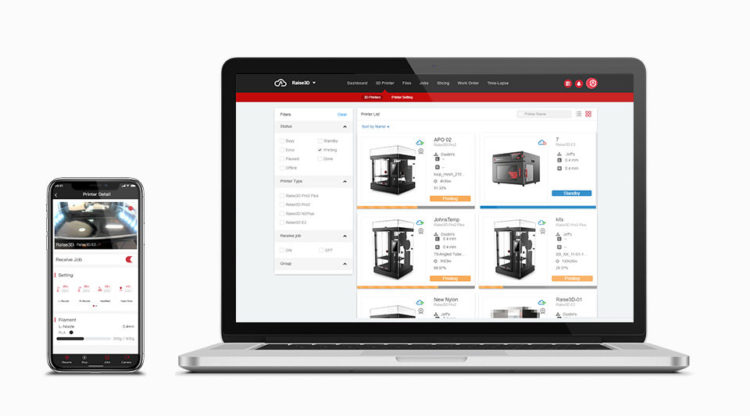
Do the same for the software interface. The page describes an advanced user interface for more complex operations than many other slicers. It also describes a workflow for adopting new materials, refining slicing, scheduling print planning, and monitoring printing tasks. These statements can help planners map responsibilities between preparation, review, and monitoring. They should not be expanded into claims about staffing, integration, automation, or availability unless those points are separately documented.
Hardware assumptions need equal care. The page lists FFF, Dual IDEX, flexible and fiber-reinforced filaments, and an enclosed build chamber in its slicer-related material. It separately states that the NVIDIA GeForce series is recommended, such as the NVIDIA GeForce RTX 4070, when using the RMS220 printer. Keep the RMS220 condition attached to that graphics-card statement. Do not transfer it to another printer or treat the listed hardware as a universal requirement.
Prepare a focused sourcing brief
End the worksheet with a short sourcing brief. State the intended application, named printer or solution, material context, users, workstation constraints, and the evidence that supports each requirement. Add only the questions that can change the decision. Examples include which documented profile applies, which parameters must be reviewed, what preview information is needed, and which workflow stages belong to the maintenance team.
- Separate the software category, intended application, and named printer or solution before comparing claims.
- Record preview information such as tool path, speed, layer height, extruder, and structure type as documented evidence.
- Check whether the required change concerns a group, layer, or volume within a loaded model.
- Keep model-specific conditions attached to the evidence, including the DF2+ and DF2 Solution resin-template scope.
A good brief also preserves boundaries. Mark claims that apply only to a named model, material, or workflow. Mark broader recommendations as planning needs rather than product facts. This makes the document easier to revise when a supplier answer adds detail, and it prevents early research from creating an accidental specification.
The goal is a defensible next step, not a premature winner. By separating category, application, model scope, evidence, and assumptions, maintenance planners can compare a 3D printer slicer against the work they actually need to organize. The captured page gives Raise3D useful, bounded points for that worksheet, including profiles, previews, parameter controls, and workflow descriptions, while the final sourcing brief keeps every unresolved decision visible.

